Spreadsheet for Google Sheets and Excel
Your 2027 money, in one workbook.
Plan the year, log each month, schedule your debt payoff and watch your net worth, without building a spreadsheet from scratch.
Get the workbook for $14Instant download: you go straight to your files after payment. If the files don't work for you, tell us within 14 days and we'll fix it or refund you.
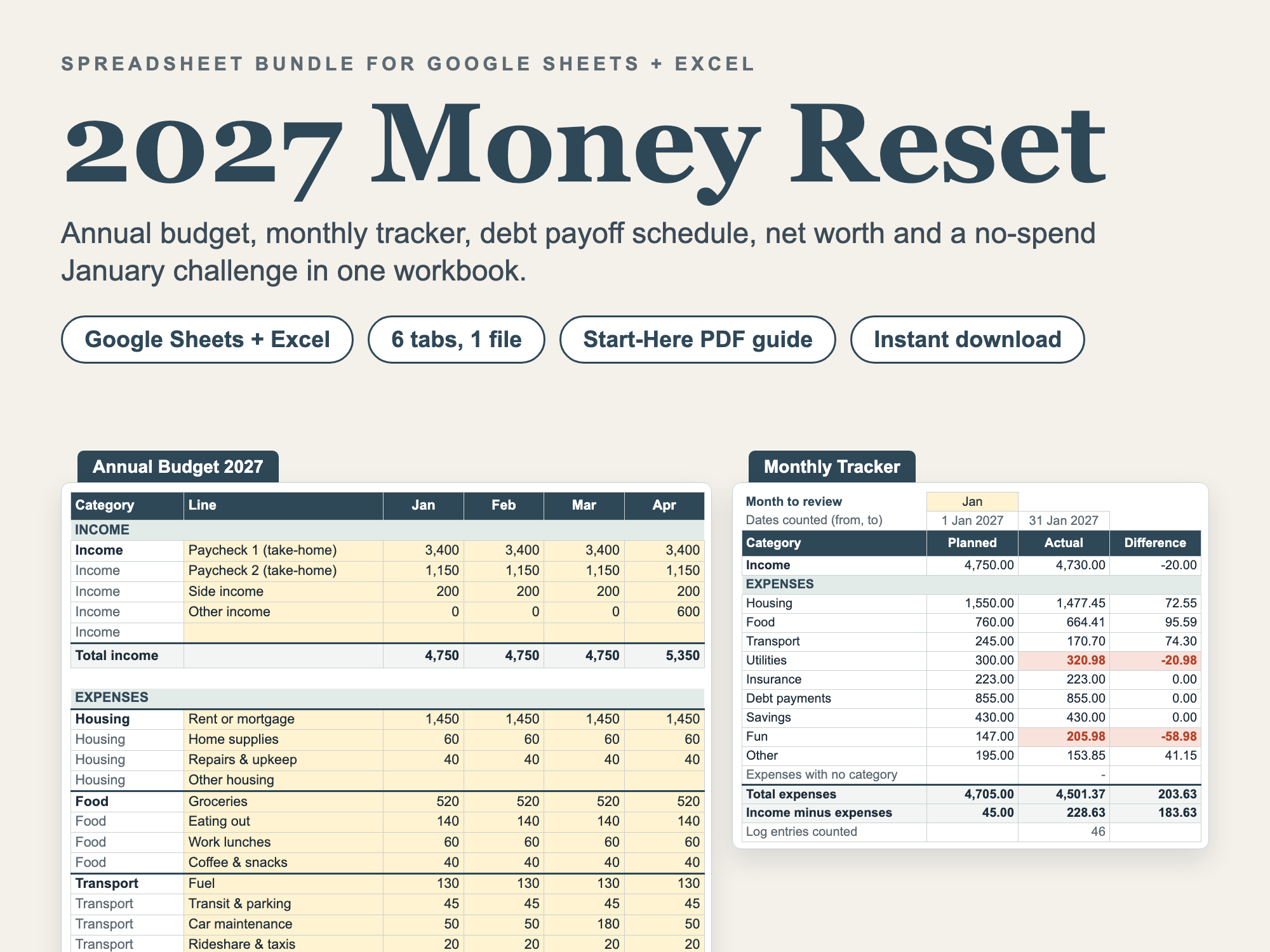
What's in the workbook
Annual Budget 2027
Five income lines and nine expense categories, a planned amount for every month, and planned income minus expenses.
Monthly Tracker
A log for 500 entries. Pick a month and see actual spending next to the plan, with over-budget lines highlighted.
Debt Payoff
Up to 8 debts, snowball or avalanche order, an extra monthly payment, and a month-by-month schedule to the payoff month.
Net Worth and No-Spend January
Assets and liabilities by month, plus a 31-day January grid with the right weekdays.
How it works
Open it
Google Sheets: File, Import, Upload. Excel: double-click. The Start Here guide shows both.
Clear the sample data
The Start tab lists the exact cells. Shaded cells are for typing; everything else calculates.
Type your numbers
Budget first, then log as you go. Check the tracker once a month.
One price, no subscription
- One workbook with six tabs: annual budget, monthly tracker, debt payoff, net worth, no-spend January, and a start page
- Sample data filled in so you can see every tab working, with a list of exactly which cells to clear
- A 2-page Start Here guide (PDF)
- Standard formulas only: no macros, no scripts, no add-ons
Instant download: you go straight to your files after payment. If the files don't work for you, tell us within 14 days and we'll fix it or refund you.
Get the workbook for $14Questions
Does it connect to my bank?
No. You type the numbers in yourself. Nothing is uploaded anywhere.
Which apps does it work in?
It is built with standard formulas for Google Sheets and Microsoft Excel. We have checked every formula against independent calculations and opened it in Apple Numbers; if it misbehaves in your version of Sheets or Excel, tell us and we'll fix it or refund you.
How does the debt schedule calculate interest?
Once a month, at APR divided by 12, rounded to the cent. Lenders often calculate daily, so treat the schedule as an estimate.
Is this financial advice?
No. It is a template and calculator for your own record-keeping, not financial, tax or legal advice.
Was it made with AI?
Yes, it was designed with AI assistance.
Not ready today?
Leave your email and we'll send one reminder. That's all.